Production LLM Systems Tutorial 10: Versioning and Disaster Recovery

Tutorial Series
- End-to-End Application Design
- Latency, Cost, and Quality
- Scalable Inference Architecture
- RAG and Data Pipelines
- Monitoring and Observability
- Evaluation and A/B Testing
- Security and Prompt Injection
- Human-in-the-Loop Workflows
- Cost Optimization
- Versioning and Disaster Recovery
LLM systems need rollback plans for more than models.
A bad release can come from a prompt, embedding model, retrieval index, reranker, safety policy, tool schema, provider route, or cache migration. If you only version model weights, most of your system is still unversioned.
This tutorial builds versioning and disaster recovery for production LLM systems.
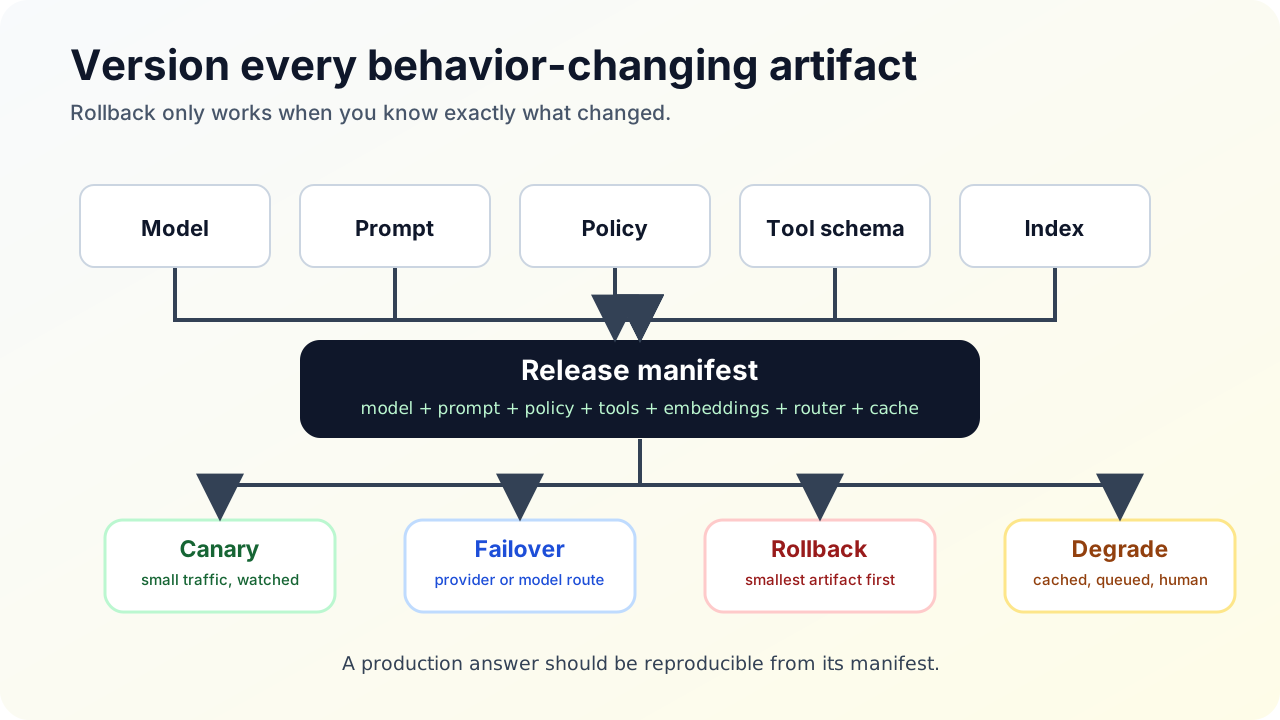
Version everything that changes behavior
Track versions for:
| Artifact | Why it matters |
|---|---|
| Model | Different behavior, cost, latency, and safety profile |
| Prompt | Changes instructions and output format |
| Tool schema | Changes available actions |
| Safety policy | Changes refusals and redactions |
| Embedding model | Changes vector space |
| Retrieval corpus | Changes evidence |
| Reranker | Changes context order |
| Cache policy | Changes reuse behavior |
| Router policy | Changes model and provider selection |
Every production answer should be reproducible from version metadata.
Model registry
A model registry should store:
- model name
- provider or serving backend
- version or checkpoint
- quantization
- context length
- supported tools or modalities
- eval scorecard
- approved routes
- rollout status
Example:
{
  "model_route": "support_mid",
  "provider": "hosted_provider_a",
  "model_version": "2026-04-30",
  "eval_suite": "support_golden_v18",
  "quality_score": 0.91,
  "p95_ttft_ms": 820,
  "approved_for": ["support_answer", "ticket_summary"]
}
Prompt registry
Prompts are code. Version them.
A prompt registry should store:
- template
- variables
- owner
- review status
- model compatibility
- eval results
- changelog
- rollback target
Bad pattern:
Prompt edited in dashboard. No review. No version. No rollback.Good pattern:
prompt support_answer_v14
  -> pull request
  -> offline eval
  -> canary
  -> promote to production
  -> retain support_answer_v13 for rollback
Embedding migration
Changing embedding model requires planning because old vectors and new vectors are not comparable.
Use blue/green indexes:
corpus_v17 + embedding_model_a -> index_blue active
corpus_v17 + embedding_model_b -> index_green build
index_green retrieval eval
index_green shadow traffic
index_green canary
index_green active
index_blue retained
Do not mix embeddings from different models in one index unless the system explicitly supports that design.
Tool schema versioning
Tool schemas are contracts between the model and your backend.
Version tool schemas when:
- fields are added
- fields are renamed
- validation changes
- side effects change
- authorization changes
Example:
{
  "tool": "create_refund_case",
  "version": "v3",
  "idempotency_required": true,
  "approval_required_above_usd": 500
}
Old prompt versions may still produce old tool arguments. Keep compatibility or migrate prompts and tools together.
Provider failover
Use a model gateway to abstract providers:
primary route
  -> provider A model X
fallback 1
  -> provider B model Y
fallback 2
  -> self-hosted model Z
degraded mode
  -> cached answer or human handoff
Failover is not just swapping endpoints. Models differ in context limits, tool-call format, safety behavior, latency, cost, and output style. Run evals on fallback routes before you need them.
Graceful degradation
Define behavior for each dependency:
| Dependency down | Degradation |
|---|---|
| Primary model | Route to approved fallback |
| All models | Return cached safe answer or human handoff |
| Vector DB | Use keyword search if safe, otherwise explain limitation |
| Reranker | Use fused retrieval with lower confidence |
| Tool API | Answer without action or create pending task |
| Observability sink | Continue service, buffer traces, alert |
Degraded answers should be honest. Do not pretend the system has checked a source it could not reach.
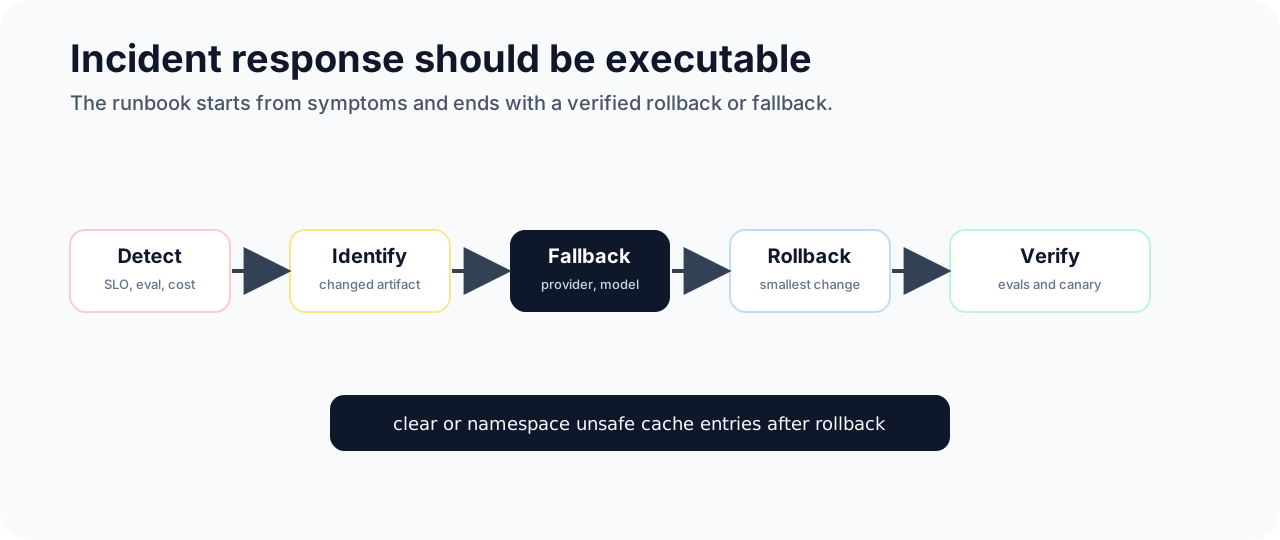
Disaster recovery runbook
Create a runbook:
1. Identify affected route.
2. Freeze rollout.
3. Check latest changes: model, prompt, index, policy, tool.
4. Compare canary and production metrics.
5. Roll back smallest changed artifact.
6. Clear or namespace unsafe cache entries.
7. Re-run targeted evals.
8. Publish incident notes.
Rollback should be a button or command, not a meeting.
Release checklist
Before promoting any change:
- artifact version recorded
- owner recorded
- eval suite passed
- safety set passed
- cost estimate reviewed
- fallback route tested
- cache invalidation plan defined
- rollback target known
- canary metrics defined
- traces sampled and reviewed
Reliability comes from boring release mechanics.
Sources and receipts
- MLflow Model Registry documentation: https://mlflow.org/docs/latest/model-registry.html
- MLflow Prompt Registry documentation: https://mlflow.org/docs/latest/genai/prompt-registry/
- LiteLLM documentation: https://docs.litellm.ai/
- AWS Well-Architected Reliability Pillar: https://docs.aws.amazon.com/wellarchitected/latest/framework/a-reliability.html
- OpenTelemetry GenAI semantic conventions: https://opentelemetry.io/docs/specs/semconv/gen-ai/