Production LLM Systems Tutorial 4: RAG and Data Pipelines

Tutorial Series
- End-to-End Application Design
- Latency, Cost, and Quality
- Scalable Inference Architecture
- RAG and Data Pipelines
- Monitoring and Observability
- Evaluation and A/B Testing
- Security and Prompt Injection
- Human-in-the-Loop Workflows
- Cost Optimization
- Versioning and Disaster Recovery
RAG is not a vector database.
RAG is a data system that happens to use vectors. The retrieval result is only as good as ingestion, chunking, metadata, freshness, permissions, reranking, and context packing. If those pieces are weak, the model will produce confident answers from weak evidence.
This tutorial builds a production RAG pipeline.
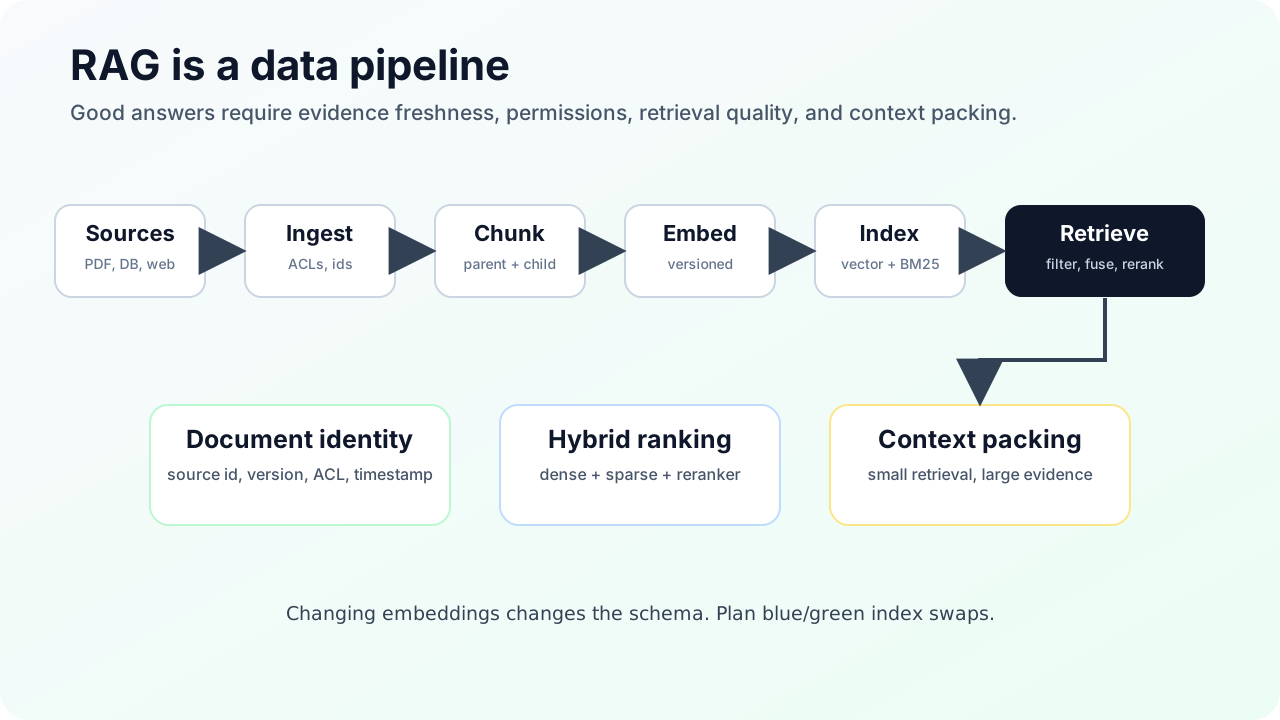
The pipeline
source systems
  -> ingestion
       connectors, ACLs, metadata, document ids
  -> normalization
       text extraction, tables, OCR, cleanup
  -> chunking
       parent docs, child chunks, overlap
  -> embedding
       model version, dimension, batching
  -> indexing
       vector index, BM25 index, metadata indexes
  -> retrieval
       query rewrite, filters, dense search, sparse search
  -> fusion and rerank
       reciprocal rank fusion, cross-encoder reranker
  -> context packing
       dedupe, cite, budget, order
  -> generation
       answer with evidence
The retrieval step is in the middle, not the beginning.
Step 1: Preserve document identity
Every document needs stable identifiers:
{
  "document_id": "policy_2026_042",
  "source_system": "sharepoint",
  "source_url": "https://...",
  "tenant_id": "tenant_a",
  "acl_hash": "acl_98d2",
  "version": "2026-05-01T10:15:00Z",
  "deleted": false
}
Do not index anonymous text chunks. You need to trace every answer back to the original document, permission scope, and corpus version.
Step 2: Chunk for retrieval and context separately
Fixed-size chunking is easy. It is rarely best.
Use recursive chunking as the baseline because it tries to keep paragraphs, sentences, and words together. For long documents, use parent-document retrieval:
- small child chunks for vector search
- larger parent section for context
- original document for citation and audit
Example:
Parent: "Refund Policy, Section 4: Enterprise Exceptions" 1800 tokens
  child chunk 1: 300 tokens
  child chunk 2: 300 tokens
  child chunk 3: 300 tokens
The small chunks find the relevant area. The parent gives the model enough context to avoid answering from a sentence fragment.
Step 3: Treat embeddings as schema
Embedding choices affect storage, recall, latency, and migration cost.
Track:
- embedding model name
- embedding model version
- dimension
- normalization
- distance metric
- language coverage
- corpus version
Changing embedding model is a schema migration. You usually need a full corpus re-embed and a blue/green index swap.
Matryoshka-style embeddings are useful when you want one embedding model that can support multiple dimensions. The trade-off is still empirical: test recall and rerank quality at each dimension you plan to use.
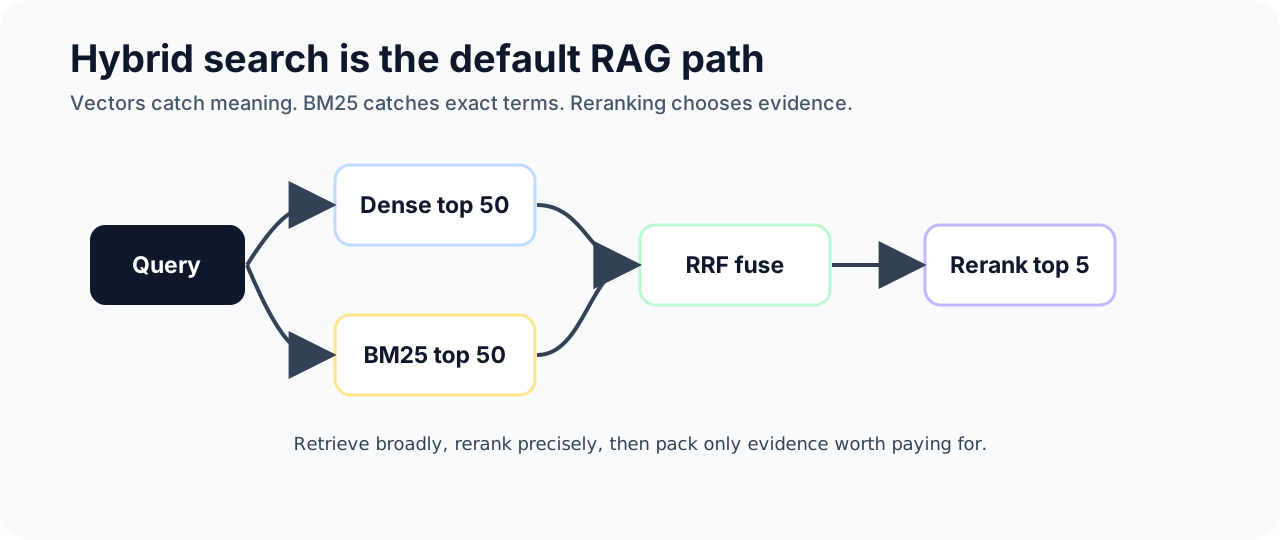
Step 4: Use hybrid search by default
Dense vectors are good at semantic similarity. BM25 is good at exact terms, codes, product names, error messages, IDs, and rare words.
Use both:
query
  -> dense retrieval top 50
  -> BM25 retrieval top 50
  -> reciprocal rank fusion
  -> rerank top 50 to top 5
Reciprocal rank fusion is simple and robust. It lets exact keyword matches and semantic matches compete without forcing you to calibrate raw scores across different retrieval systems.
Step 5: Rerank before generation
Vector search is candidate generation. Reranking is precision.
A cross-encoder reranker compares query and document directly. This costs extra latency, but it usually improves the quality of the final context. A common pattern:
- Retrieve 50 candidates.
- Rerank to 5 to 10.
- Deduplicate near-identical chunks.
- Pack context with citation ids.
Do not feed top 50 directly into the model unless you want higher cost and more distraction.
Step 6: Filter permissions before retrieval when possible
If the user can only access 1 percent of the corpus, do not retrieve from 100 percent and filter afterward.
Use metadata filters for:
- tenant
- user or group ACL
- region
- product
- document type
- effective date
- deletion status
Pre-filtering improves safety but can reduce recall if the vector database handles filters poorly. Post-filtering can improve recall but risks retrieving inaccessible chunks and then throwing away too many results. For sensitive data, safety wins. Tune the index and metadata strategy around that constraint.
Step 7: Build for updates
RAG systems go stale quietly.
Use an update pipeline:
source change event
  -> fetch document
  -> extract text
  -> compare version
  -> mark old chunks inactive
  -> write new chunks
  -> embed new chunks
  -> update search indexes
  -> publish corpus version
For large migrations, use blue/green indexes:
index_v17 active
index_v18 building
index_v18 eval
index_v18 shadow traffic
index_v18 active
index_v17 retained for rollback
Never rebuild the only index in place.
Step 8: Evaluate retrieval separately
Answer quality can hide retrieval failures. Measure retrieval directly:
- context recall: did we retrieve the needed evidence?
- context precision: was retrieved context useful?
- citation accuracy: did citations support the answer?
- permission correctness: did retrieval respect access control?
- freshness: did the answer use current document versions?
If retrieval recall is bad, prompt tuning will not fix it.
Sources and receipts
- LangChain, “Recursive text splitter”: https://docs.langchain.com/oss/python/integrations/splitters/recursive_text_splitter
- LangChain, “ParentDocumentRetriever”: https://api.python.langchain.com/en/latest/langchain/retrievers/langchain.retrievers.parent_document_retriever.ParentDocumentRetriever.html
- Cohere Rerank documentation: https://docs.cohere.com/v2/docs/rerank
- Qdrant documentation, vector search and filtering: https://qdrant.tech/documentation/
- Weaviate documentation, vector indexing: https://docs.weaviate.io/weaviate/concepts/vector-index
- pgvector documentation: https://github.com/pgvector/pgvector