Production LLM Systems Tutorial 2: Latency, Cost, and Quality

Tutorial Series
- End-to-End Application Design
- Latency, Cost, and Quality
- Scalable Inference Architecture
- RAG and Data Pipelines
- Monitoring and Observability
- Evaluation and A/B Testing
- Security and Prompt Injection
- Human-in-the-Loop Workflows
- Cost Optimization
- Versioning and Disaster Recovery
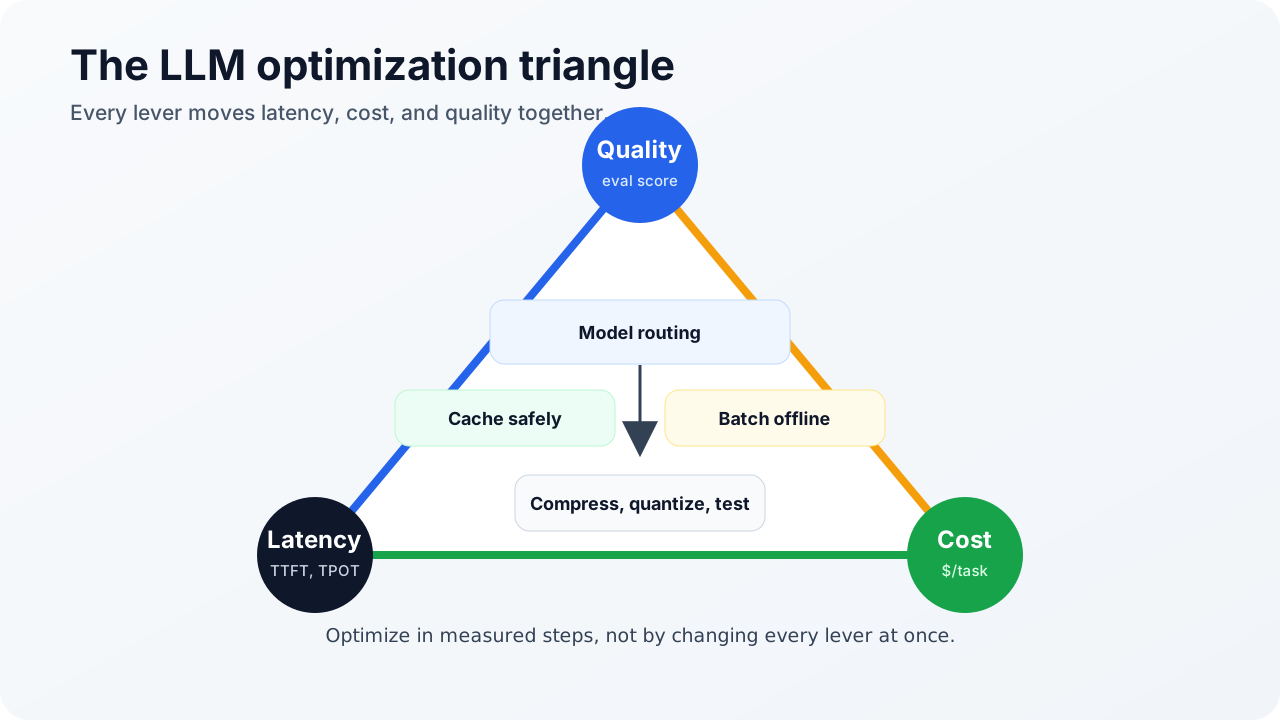
Every production LLM system lives inside a triangle:
          quality
            /\
           /  \
          /    \
         /      \
 latency -------- cost
You can improve one corner for free during a demo. At production scale, every improvement moves pressure somewhere else. A larger model improves answer quality but raises latency and cost. A semantic cache cuts cost but can serve stale answers. Quantization improves capacity but may damage hard reasoning. Prompt compression lowers token spend but can remove the detail the model needed.
This tutorial gives you the control panel.
Step 1: Measure the right latency
Do not use only “average latency.” It hides what users actually feel.
Use these metrics:
| Metric | Meaning | Why it matters |
|---|---|---|
| TTFT | Time to first token | Dominates chat perceived responsiveness |
| TPOT | Time per output token | Determines streaming smoothness |
| p50 | Median latency | Useful for baseline behavior |
| p95/p99 | Tail latency | Shows queueing, cold starts, overload, and provider variance |
| End-to-end task time | Total time to useful outcome | Captures retrieval, tools, model calls, and retries |
If a request calls tools, do not blame the model until you split the trace:
request total: 8.2s
  auth/rate limit: 12ms
  retrieval: 420ms
  rerank: 180ms
  model TTFT: 760ms
  model stream: 3.1s
  tool call: 3.5s
  validation: 90ms
This trace says the tool is the bottleneck, not the model.
Step 2: Route work by difficulty
The cheapest optimization is not using the expensive model for easy work.
Start with a router:
request
  -> classify difficulty and risk
  -> easy factual task: small model
  -> normal assistant task: mid model
  -> complex reasoning or high-risk answer: large model
  -> unsafe or unsupported: refuse or escalate
Routing can be rules, a small classifier, or a cheap model. The router should look at task type, required tools, tenant policy, maximum budget, and confidence from previous attempts.
A common pattern:
- Try a small model for extraction, classification, formatting, and simple summarization.
- Use a mid-size model for most chat and RAG synthesis.
- Reserve the strongest model for hard reasoning, ambiguous user intent, and high-value workflows.
- Escalate only when evals prove escalation improves outcomes.
Routing without evals is just cost cutting with nicer words.
Step 3: Cache only what is safe to cache
Use two cache layers:
| Cache | Key | Best for | Main risk |
|---|---|---|---|
| Exact cache | Prompt hash plus model and prompt version | Repeated deterministic requests | Misses paraphrases |
| Semantic cache | Embedding similarity plus tenant and policy scope | Similar user questions | Stale or wrong reuse |
For semantic cache, the threshold is a product decision. A threshold near 0.95 may work for FAQ-style questions. Lower thresholds need stronger validation and narrower domains.
Never cache across tenants unless the answer is explicitly public and policy-approved. Cache keys should include:
- tenant id
- user permission scope
- prompt version
- model version
- retrieval corpus version
- safety policy version
If any of those change, the cache entry may be invalid.
Step 4: Compress context carefully
Prompt compression is useful when long context dominates cost. Techniques like LLMLingua show that prompts can often be shortened substantially while preserving task performance, but compression is not free.
Use compression when:
- context is long and redundant
- the answer only needs a few facts
- latency or cost is constrained
- the compression model is cheaper than the saved generation cost
Avoid compression when:
- legal wording matters
- code details matter
- the task depends on edge cases
- retrieval already produced tight context
The safe pattern is “retrieve small, expand parent, then compress only if the packed context exceeds budget.”
Step 5: Use batching for throughput, not magic
Self-hosted inference depends on batching. Static batching waits for a group and processes them together. Continuous batching, used by systems such as vLLM, keeps adding and removing requests as sequences progress.
Continuous batching helps because generation is uneven. One user may request 20 output tokens. Another may request 2,000. Static batches make fast requests wait behind slow ones.
Batching has a downside: queueing. If your system waits too long to build a large batch, TTFT suffers. That is why serving systems need a scheduler, not just a batch size.
Track:
- queue depth
- waiting time before prefill
- active sequences
- KV cache pressure
- tokens per second
- TTFT and TPOT by route
Step 6: Quantize with evals, not hope
Quantization reduces memory and often improves serving capacity. The path usually goes from FP16/BF16 to FP8, INT8, or INT4-style weight quantization.
The trade-off is task-dependent. A quantized larger model can outperform a smaller full-precision model, but the answer depends on model family, bit width, calibration, task difficulty, and serving engine.
Run evals for:
- instruction following
- hallucination sensitivity
- tool argument formatting
- domain vocabulary
- long-context retrieval
- safety refusals
Do not approve quantization because benchmark throughput improved. Approve it because the eval suite says the quality loss is acceptable for that route.
Step 7: Try speculative decoding when decode dominates
Speculative decoding uses a cheaper draft model to propose tokens and a larger target model to verify them. It works best when decode is the bottleneck and the draft model’s predictions are frequently accepted.
It works poorly when:
- prompts are huge and prefill dominates
- the draft model is too slow
- acceptance rate is low
- the workload is tool-latency-bound
- memory pressure from the draft model reduces batch size
Measure before and after:
baseline:
  TTFT 820ms
  TPOT 42ms
  cost/request $0.018

with speculation:
  TTFT 910ms
  TPOT 24ms
  cost/request $0.020
That may be worth it for long generations and not worth it for short answers.
The optimization order
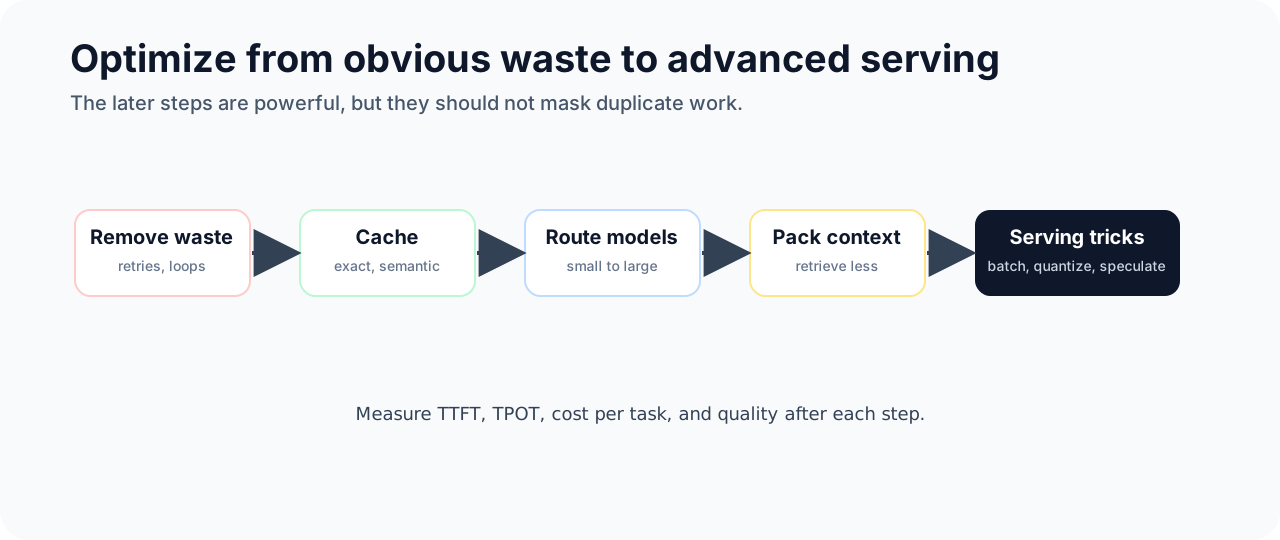
Use this order for most applications:
- Reduce unnecessary calls with product flow changes.
- Add exact cache for deterministic and repeated requests.
- Add model routing.
- Tighten retrieval and context packing.
- Add semantic cache where freshness can be controlled.
- Use batch processing for offline jobs.
- Tune serving engine, batching, and KV cache.
- Evaluate quantization.
- Evaluate speculative decoding.
- Revisit prompt compression for long-context routes.
Do not start with exotic serving tricks if half your traffic is duplicate retries.
Sources and receipts
- vLLM documentation: https://docs.vllm.ai/
- Kwon et al., “Efficient Memory Management for Large Language Model Serving with PagedAttention”: https://arxiv.org/abs/2309.06180
- NVIDIA TensorRT-LLM documentation: https://docs.nvidia.com/tensorrt-llm/
- SGLang documentation: https://docs.sglang.io/
- Jiang et al., “LLMLingua: Compressing Prompts for Accelerated Inference of Large Language Models”: https://arxiv.org/abs/2310.05736
- Leviathan et al., “Fast Inference from Transformers via Speculative Decoding”: https://arxiv.org/abs/2211.17192