Production LLM Systems Tutorial 8: Human-in-the-Loop Workflows

Tutorial Series
- End-to-End Application Design
- Latency, Cost, and Quality
- Scalable Inference Architecture
- RAG and Data Pipelines
- Monitoring and Observability
- Evaluation and A/B Testing
- Security and Prompt Injection
- Human-in-the-Loop Workflows
- Cost Optimization
- Versioning and Disaster Recovery
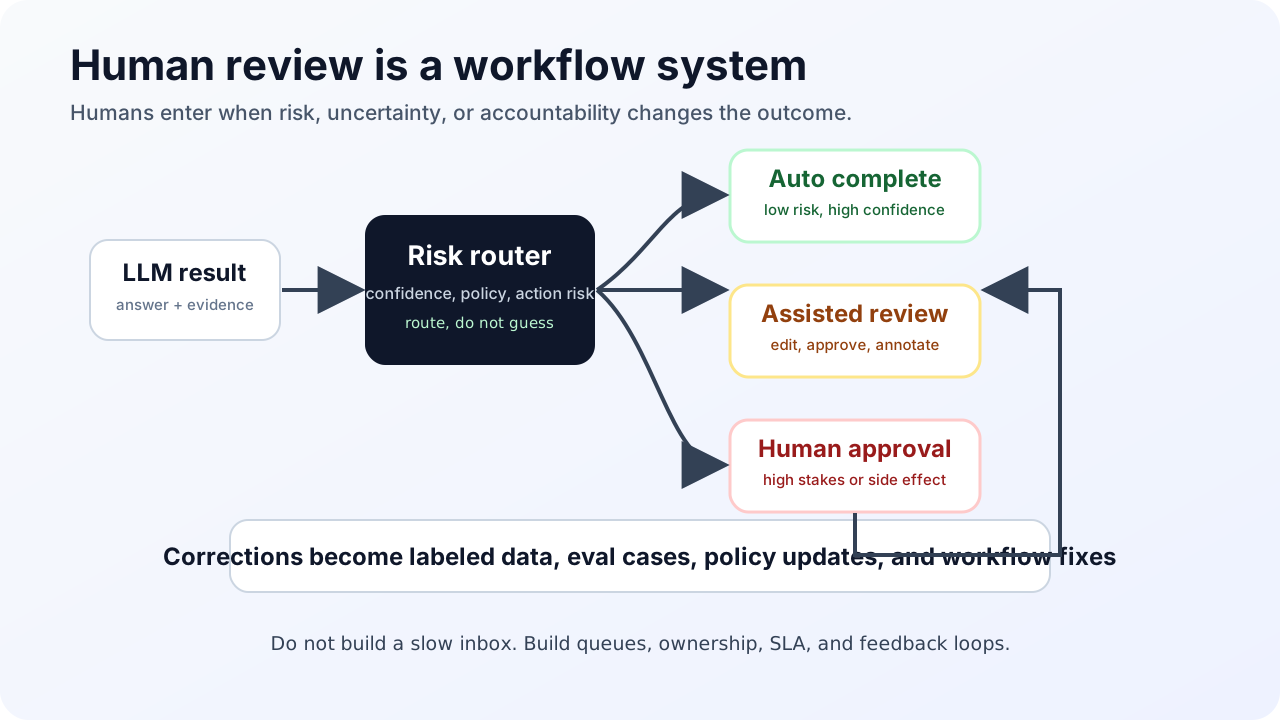
Human-in-the-loop is not a button that says “send to human.”
It is a workflow system. It needs routing, queues, ownership, context, SLAs, review tools, feedback capture, and a way to turn corrections into better software. Without that, human review becomes a slow inbox attached to a fast model.
This tutorial designs a real HITL workflow.
Step 1: Decide when humans enter
Use humans for risk, uncertainty, and accountability.
Common routing triggers:
| Trigger | Example |
|---|---|
| Low confidence | Model or evaluator reports insufficient evidence |
| High stakes | Medical, legal, financial, safety, employment, security |
| Policy boundary | User requests something near restricted behavior |
| Tool risk | Action changes money, permissions, data, or external state |
| User escalation | User explicitly asks for a person |
| Quality failure | Judge score or user feedback falls below threshold |
Do not route every hard question to a human. Route the questions where human judgment changes the outcome.
Step 2: Define confidence as a system signal
Self-reported model confidence is weak by itself. Combine signals:
confidence =
  retrieval_score
  + rerank_margin
  + answer_groundedness
  + tool_success
  + policy_classifier_score
  + historical route quality
Example:
| Signal | Value | Interpretation |
|---|---|---|
| top rerank score | 0.83 | Good |
| score gap top1-top2 | 0.04 | Ambiguous |
| groundedness judge | 0.61 | Weak |
| user risk level | high | Needs care |
| tool status | unavailable | Cannot verify |
This should route to a human or produce a limited answer.
Step 3: Build an escalation object
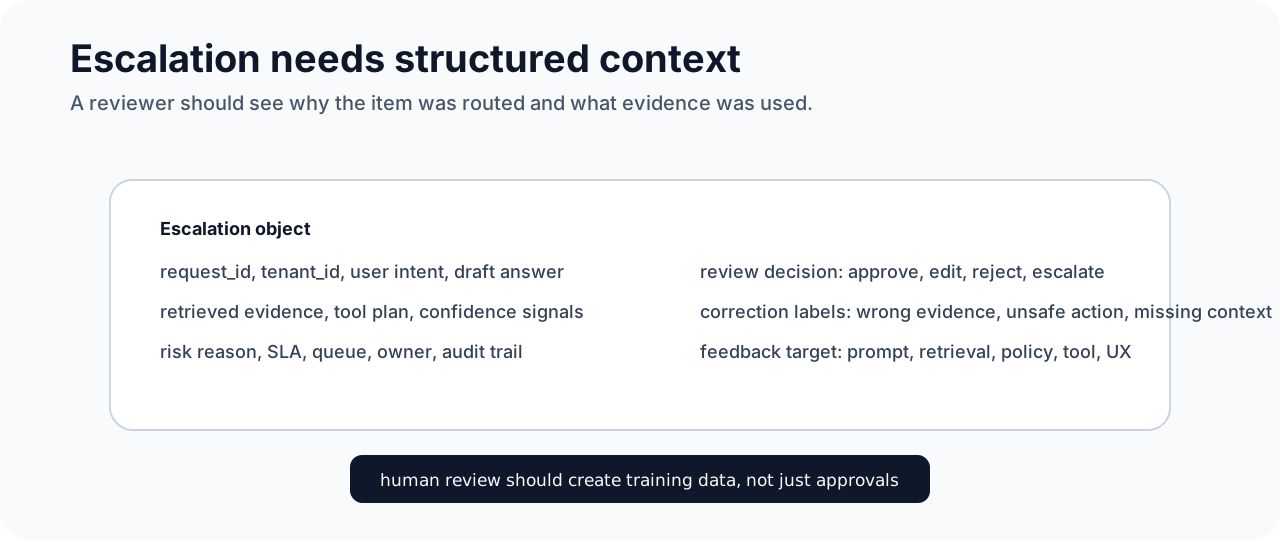
When the system escalates, create a structured task:
{
  "case_id": "case_123",
  "tenant_id": "tenant_a",
  "user_question": "...",
  "model_draft": "...",
  "evidence": [
    {"document_id": "policy_7", "quote": "...", "score": 0.91}
  ],
  "tool_results": [],
  "risk_level": "high",
  "reason_for_escalation": "low groundedness and high-risk domain",
  "sla_deadline": "2026-05-09T18:00:00Z"
}
Do not ask reviewers to reconstruct the trace from logs. Give them the draft, evidence, policy, and reason.
Step 4: Design queues by skill and SLA
One queue is not enough.
Route by:
- domain expertise
- language
- tenant
- risk level
- SLA
- required approval authority
Example queues:
| Queue | SLA | Reviewer |
|---|---|---|
| Low-risk correction | 24h | Content ops |
| Billing dispute | 4h | Support specialist |
| Legal policy question | 1 business day | Legal reviewer |
| Security action | 30m | Security operator |
The model should not decide final approval authority. The workflow system should.
Step 5: Capture corrections as training data
A good review UI captures:
- accepted answer
- edited answer
- rejected answer
- missing evidence
- incorrect evidence
- better retrieval query
- policy reason
- reviewer notes
Convert that into datasets:
reviewed_cases
  -> golden eval examples
  -> retrieval hard negatives
  -> prompt regression tests
  -> fine-tuning candidates
  -> policy classifier examples
Do not fine-tune on every correction blindly. Some corrections reflect temporary policy, bad retrieval, or one-off user context. Label first.
Step 6: Use approval gates for actions
For high-impact tools, use approval before execution:
model proposes action
  -> policy engine classifies impact
  -> dry-run tool produces preview
  -> human approves or edits
  -> system executes with idempotency key
  -> audit log records approver
Example:
{
  "proposed_action": "issue_refund",
  "amount": 4200,
  "currency": "USD",
  "customer_id": "cust_981",
  "policy_basis": "enterprise exception",
  "requires_approval": true
}
The human approves a structured action, not a paragraph.
Step 7: Measure the workflow
Track:
- escalation rate
- approval rate
- rejection rate
- average handling time
- SLA miss rate
- model draft acceptance rate
- reviewer edit distance
- repeat escalation reasons
- downstream user satisfaction
If escalation rate rises after a release, something changed. It may be model quality, retrieval quality, policy strictness, or traffic mix.
Sources and receipts
- NIST AI Risk Management Framework: https://www.nist.gov/itl/ai-risk-management-framework
- NIST AI RMF 1.0 publication: https://www.nist.gov/publications/artificial-intelligence-risk-management-framework-ai-rmf-10
- Arize Phoenix evaluation documentation: https://arize.com/docs/phoenix/evaluation/llm-evals
- Langfuse annotation and evaluation documentation: https://langfuse.com/docs/