Production LLM Systems Tutorial 9: Cost Optimization

Tutorial Series
- End-to-End Application Design
- Latency, Cost, and Quality
- Scalable Inference Architecture
- RAG and Data Pipelines
- Monitoring and Observability
- Evaluation and A/B Testing
- Security and Prompt Injection
- Human-in-the-Loop Workflows
- Cost Optimization
- Versioning and Disaster Recovery
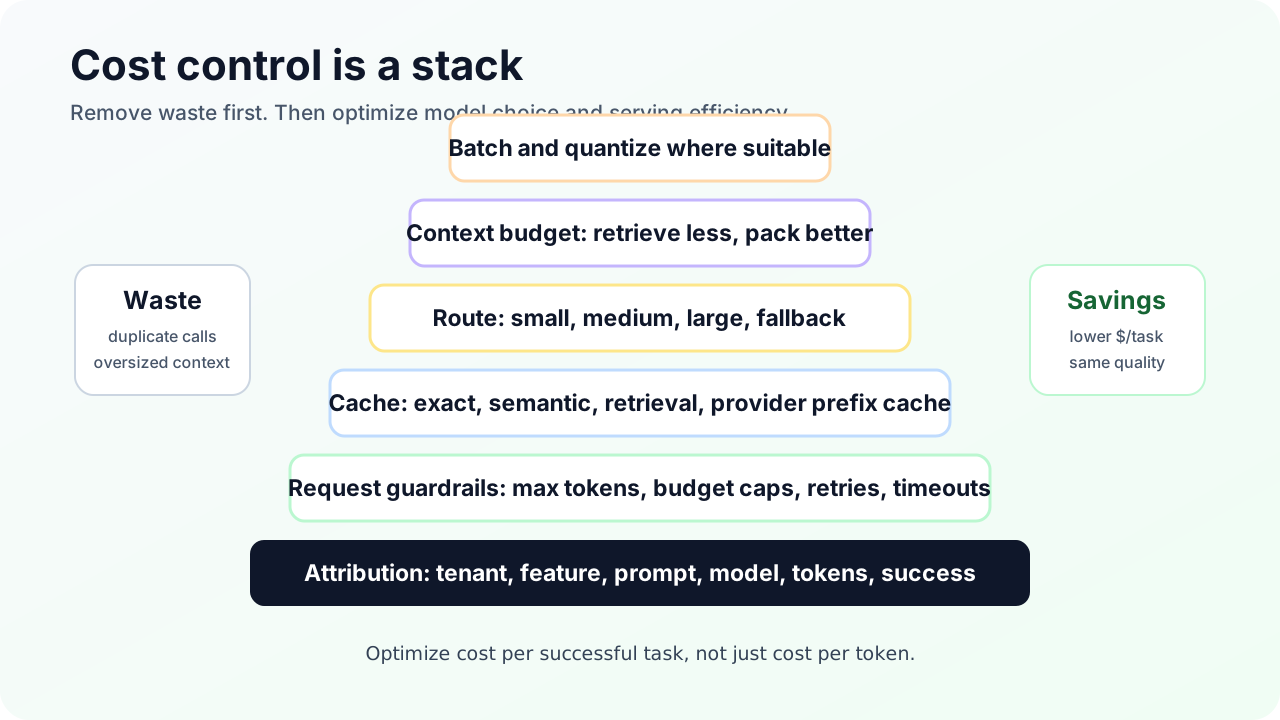
LLM cost optimization is not one trick. It is a stack.
The biggest savings usually come from removing waste before tuning inference. Duplicate retries, oversized context, no routing, missing cache keys, and unbounded output tokens can cost more than the model choice itself.
This tutorial builds a cost-control system.
Step 1: Attribute cost
Before optimizing, tag every request:
{
  "tenant_id": "tenant_a",
  "feature": "support_answer",
  "route": "rag_mid_model",
  "prompt_version": "support_v14",
  "model": "model_route_mid",
  "input_tokens": 1840,
  "output_tokens": 322,
  "cached_tokens": 0,
  "cost_usd": 0.0142,
  "success": true
}
Dashboards should show:
- cost by tenant
- cost by feature
- cost by route
- cost by prompt version
- cost by model
- cost per successful task
- retry cost
- cache savings
- token budget violations
If you cannot answer “which feature spent the money,” you do not have FinOps. You have a bill.
Step 2: Stop duplicate generation
Duplicate retries are silent cost leaks.
Use:
- idempotency keys
- request deduplication
- stream resume where possible
- retry budgets
- circuit breakers
- cached final result by request id
When a client times out after 15 seconds and retries, the backend should not blindly generate again. It should check whether the first request is still running or already completed.
Step 3: Route easy work to cheaper models
Model routing often saves more than prompt tuning.
Routes:
| Workload | Candidate route |
|---|---|
| Classification | small model or embedding classifier |
| Extraction | small or mid model with schema validation |
| Simple FAQ | cache or small model |
| RAG synthesis | mid model |
| Complex reasoning | large model |
| High-risk final answer | large model plus review |
Measure cost per successful task, not only cost per request.
Step 4: Use cache layers
Use exact cache first:
cache_key = hash(
  tenant_id,
  user_scope,
  prompt_version,
  model_version,
  normalized_input,
  corpus_version
)
Then add semantic cache only for domains where freshness is controlled. A semantic cache should store:
- original query
- normalized query
- embedding model
- answer
- evidence ids
- corpus version
- expiration
- safety policy version
Cache invalidation is a product policy. Pricing answers, legal policies, inventory, and incident status need different TTLs.
Step 5: Budget context
Long prompts are often self-inflicted.
Set budgets:
system prompt: 400 tokens
developer policy: 500 tokens
conversation window: 1500 tokens
retrieved context: 3500 tokens
tool results: 1000 tokens
output max: 800 tokens
Then enforce them. Retrieval should return the best evidence that fits, not every chunk that matched. Tool results should be summarized or structured. Conversation history should be compacted.
Step 6: Use batch APIs for offline jobs
Not all work is interactive.
Good batch candidates:
- offline evals
- document classification
- embedding corpus jobs
- nightly summarization
- backfills
- report generation
OpenAI’s Batch API, for example, is designed for asynchronous jobs with lower cost and a 24-hour completion window. That is not suitable for chat UX, but it is ideal for evals and corpus processing.
Step 7: Quantize self-hosted models
For self-hosting, quantization can reduce memory footprint and increase serving density. It can also change quality. Treat quantization as a route-specific release:
- Pick target model and quantization method.
- Run golden evals.
- Run safety evals.
- Run latency and throughput benchmarks.
- Canary low-risk traffic.
- Compare cost per successful task.
Do not approve quantization from throughput alone.
Step 8: Add guardrails
Cost guardrails:
- max input tokens per route
- max output tokens per route
- max tool steps
- max retries
- max cost per request
- daily tenant budget
- feature-level budget
- alert on cost anomaly
If a user asks for a 200-page answer, the system should negotiate scope instead of obeying.
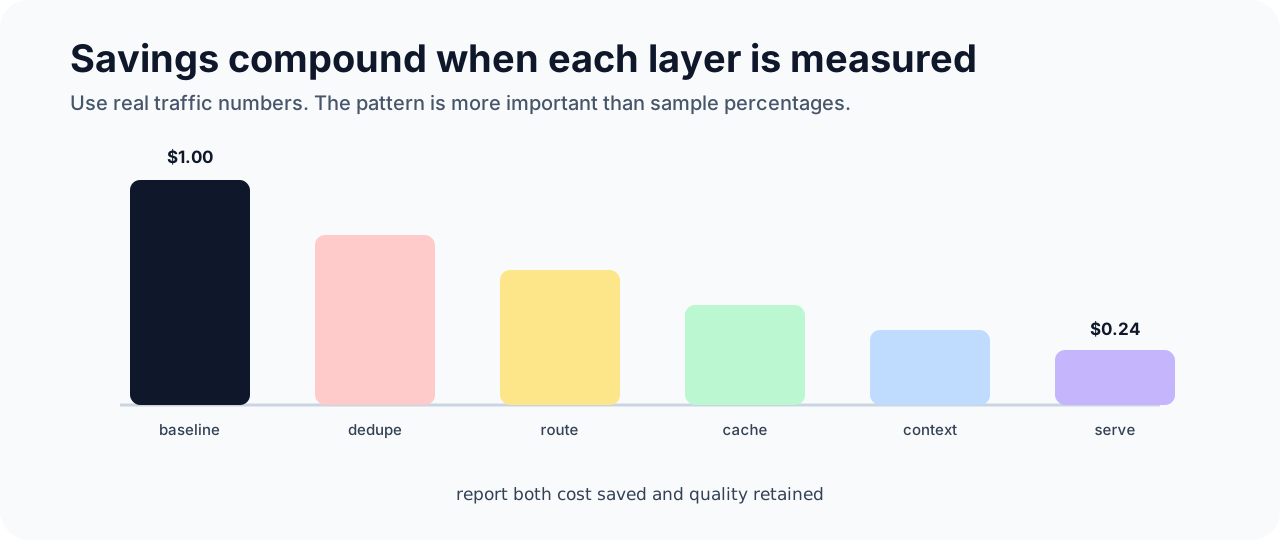
A sample savings stack
Example starting point:
100,000 requests/day
average cost: $0.020
daily cost: $2,000
After changes:
| Change | Savings |
|---|---|
| Deduplicate retries | 8% |
| Route easy work | 45% |
| Exact cache | 12% |
| Semantic cache on FAQ route | 18% |
| Context budget | 20% |
| Batch offline jobs | 50% on eligible work |
Savings compound, but not perfectly. Measure each layer with attribution.
Sources and receipts
- OpenAI Batch API guide: https://platform.openai.com/docs/guides/batch
- OpenAI API pricing: https://openai.com/api/pricing/
- vLLM documentation: https://docs.vllm.ai/
- NVIDIA TensorRT-LLM documentation: https://docs.nvidia.com/tensorrt-llm/
- LiteLLM documentation: https://docs.litellm.ai/